


|
|
|
|
|
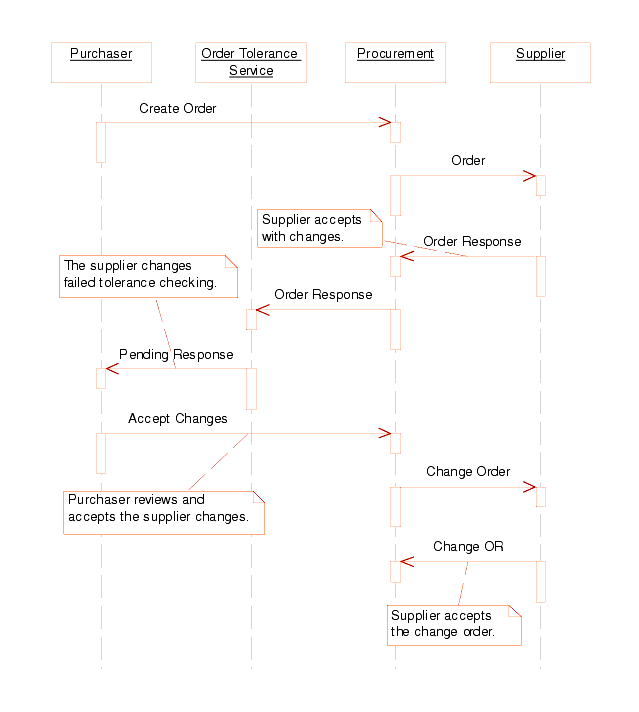
Description: An order is created by the Purchaser and sent to the supplier. The supplier makes changes to the order (ex. price change to one of the items) and sends back an order response with a response type code that maps to Changed and an order status of Accepted With Changes.Shortly after Procurement receives the response to the change order, the Order Tolerance service processes the response. The service checks the supplier changes against the tolerance rules setup for the supplier at the buying organization's supplier option level. In this case, the changes were not within the tolerance levels of the system.
At this point, the Purchaser needs to review the supplier changes. The Purchaser is presented with three options, either accept the changes, reject the changes with a change to the supplier changes or cancel the order. In this case, the Purchaser decides to accept the supplier changes. Therefore, the order is updated with the supplier changes.
After manually accepting the supplier's update to the order, if the ConfirmChange EBO application setting is on (which it is by default), Procurement will send a change order to the supplier. The change order is simply a copy of the latest accepted order for the purpose of confirming the buyer's acceptance of the supplier's update.
Finally, the supplier accepts the buyer issued change order. So, the order status for the buyer is Accepted By Supplier. Therefore, the buyer and supplier may each take the same actions as in the Order Accepted By Supplier case above. In this scenario, however, both buyer and supplier leave the order as Accepted.
